FOREWORD
I learned, after getting the stuff below working, that this isn’t quite enough to get things working to my liking. There can still be extremely stale TLE data laying around after tweaking the TLE URLs. Please see Part 2 for an additional fix that cleans things up even better.
Problem
I installed gpredict tonight on Debian 12, and found that, while the Gpredict version appears to be up to date, the URLs for the TLE data are not.
Here’s what I’m seeing after a fresh install of Gpredict, under Edit -> Preferences -> TLE Update:
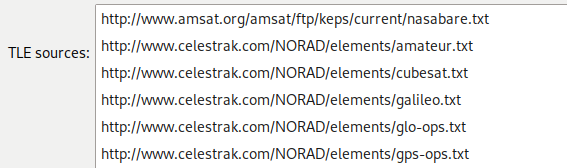
A quick look around online shows that http://www.celestrak.com has moved to http://www.celestrak.org, quite a while ago, I think.
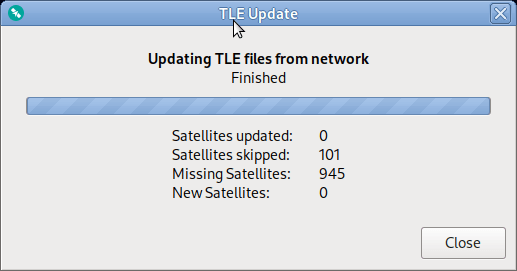
Anyway, you can see when you try to update your TLE data using these sources, that it misses a lot of stuff (everything?):
Root Cause
I was curious about how this is so outdated, so I dug around a bit. It turns out that the TLE URLs are actually hard-coded in src/sat-cfg.c in the gpredict repo:
229     {"TLE", "URLS",
230      "http://www.amsat.org/amsat/ftp/keps/current/nasabare.txt;"
231      "http://www.celestrak.com/NORAD/elements/amateur.txt;"
232      "http://www.celestrak.com/NORAD/elements/cubesat.txt;"
233      "http://www.celestrak.com/NORAD/elements/galileo.txt;"
234      "http://www.celestrak.com/NORAD/elements/glo-ops.txt;"
235      "http://www.celestrak.com/NORAD/elements/gps-ops.txt;"
236      "http://www.celestrak.com/NORAD/elements/iridium.txt;"
237      "http://www.celestrak.com/NORAD/elements/iridium-NEXT.txt;"
238      "http://www.celestrak.com/NORAD/elements/molniya.txt;"
239      "http://www.celestrak.com/NORAD/elements/noaa.txt;"
240      "http://www.celestrak.com/NORAD/elements/science.txt;"
241      "http://www.celestrak.com/NORAD/elements/tle-new.txt;"
242      "http://www.celestrak.com/NORAD/elements/visual.txt;"
243      "http://www.celestrak.com/NORAD/elements/weather.txt"},
This has been updated by commit 2103b2c4a6aadbbdad326f2a9d1de49e6032f094 (“Changed top-level domains of CelesTrak TLE URLs”) in the master branch, but the Debian build clearly doesn’t have this commit
Fix
This is relatively easy to fix. The obvious solution is to just delete/re-add each entry in the TLE update menu, but there’s a bit of a faster way.
It appears that if you edit just one TLE URL manually, it spits them all into .config/Gpredict/gpredict.cfg, where they’re much easier to edit.
So, what I did here was to update one entry to “celestrak.org” and the click OK/exit the program. Once you do this, your gpredict.cfg file will get a line like this:
URLS=http://www.amsat.org/amsat/ftp/keps/current/nasabare.txt;http://www.celestrak.com/NORAD/elements/amateur.txt;http://www.celestrak.com/NORAD/elements/cubesat.txt;http://www.celestrak.com/NORAD/elements/galileo.txt;http://www.celestrak.com/NORAD/elements/glo-ops.txt;http://www.celestrak.com/NORAD/elements/gps-ops.txt;http://www.celestrak.com/NORAD/elements/iridium.txt;http://www.celestrak.com/NORAD/elements/iridium-NEXT.txt;http://www.celestrak.com/NORAD/elements/molniya.txt;http://www.celestrak.com/NORAD/elements/noaa.txt;http://www.celestrak.com/NORAD/elements/science.txt;http://www.celestrak.com/NORAD/elements/tle-new.txt;http://www.celestrak.com/NORAD/elements/visual.txt;http://www.celestrak.org/NORAD/elements/weather.txtFrom here, it’s easy to fix all the URLs up at once with a command like this:
sed -i 's/celestrak\.com/celestrak\.org/g' ~/.config/Gpredict/gpredict.cfg(You should probably back up your original gpredict.cfg before trying this)
Now you can re-launch gpredict, and confirm that the entries are correctly updated the TLE Update Preferences tab. After that, you can attempt to update your TLE data again.
This time you should see a much more sane result:

 Slapping Iron
Leave a comment